Most interview prep tools still feel like chatbots. They are useful for generating questions, but they do not create the pressure, pacing, interruption, and delivery feedback that make real interviews difficult.
That was the idea behind Interview Companion Live: build a voice-first interview agent that can hear you, see you, speak back in real time, and coach you on both what you say and how you say it.
I built it for the Gemini Live Agent Challenge, but the interesting part was not the challenge itself. The interesting part was figuring out how to make a live multimodal system feel less like a demo and more like an actual interview room.
The product goal
I wanted the experience to have four properties that text-based interview tools usually miss:
- voice-first interaction so answers feel spoken, not composed
- interruptible conversation so the exchange feels natural rather than turn-based
- job-specific grounding so the interviewer asks about the actual role, not generic trivia
- coaching during and after the session so the product is useful beyond novelty
That combination pushed the architecture in a very different direction from a normal chatbot.
Why a live agent was the right fit
For interview practice, latency and timing matter almost as much as content.
If the system pauses too long, the conversation feels fake. If it cannot handle interruptions, it feels scripted. If it only evaluates the transcript after the fact, it misses the delivery signals that people actually struggle with: pacing, hesitation, filler words, long pauses, or whether an answer had a clear STAR structure.
Gemini Live API made this possible because it supports a genuinely multimodal loop instead of a stitched-together pipeline of speech-to-text, text prompting, and text-to-speech.
In practice that meant the app could:
- listen through the microphone
- observe periodic webcam frames
- respond with streamed audio
- keep the conversation grounded in a job description and optional resume
System architecture
The final system ended up as a fairly simple three-layer design:
flowchart TB
    subgraph Browser["Browser Client"]
        UI[Setup wizard + interview UI]
        MIC[Microphone capture]
        CAM[Webcam capture]
        PLAYER[Streamed AI audio playback]
        COACH[Live signals + coach panel]
    end

    subgraph Backend["Bun + TypeScript Backend"]
        API[/REST session APIs/]
        WS[/WebSocket media bridge/]
        SESSION[Session lifecycle + reconnect]
        REPORT[Report generation]
    end

    subgraph Vertex["Google Cloud"]
        LIVE[Gemini Live API\ngemini-live-2.5-flash-native-audio]
        TEXT[Report model\ngemini-3-flash]
        RUN[Cloud Run]
    end

    UI --> API
    MIC --> WS
    CAM --> WS
    WS --> LIVE
    LIVE --> WS
    WS --> PLAYER
    API --> SESSION
    SESSION --> REPORT
    REPORT --> TEXT
    Backend --> RUN
    COACH --> UI
The browser handles capture and playback. The backend does the orchestration work: create sessions, validate inputs, bridge media over WebSocket, recover dropped sessions, and generate the final report. Cloud Run keeps the deployment simple and scales the service up only when someone is actively using it.
The real-time interaction loop
The media path is where most of the engineering complexity lives.
In the browser, microphone input is captured through AudioContext, converted to PCM16, base64-encoded, and streamed over WebSocket. Webcam input is sampled into JPEG frames and sent on the same live session. On the way back, AI audio is streamed in chunks and queued on the client so playback stays smooth even when the network is slightly uneven.
sequenceDiagram
    autonumber
    participant U as Candidate
    participant B as Browser
    participant S as Bun Server
    participant G as Gemini Live API

    U->>B: Speak answer + webcam video
    B->>S: PCM16 audio + sampled JPEG frames
    S->>G: Forward multimodal stream
    G-->>S: Streamed audio response + transcript events
    S-->>B: Audio chunks + session status
    B-->>U: Low-latency voice playback

    Note over B,S: WebSocket stays open for the live session
    Note over B,G: Browser keeps transcript, live metrics, and UI state in sync
This is the main reason I liked the Live API approach. The architecture stays focused on a single live conversational loop instead of constantly translating between separate subsystems.
In my testing, the audio path was usually in the rough ~200-400ms range end to end, which is the difference between something that feels usable and something that feels like talking through a wall.
Grounding the interviewer
Raw real-time conversation is not enough on its own. A generic interviewer is interesting for five minutes and then becomes repetitive.
So the app starts with structured grounding:
- required job description
- optional resume/background
- difficulty mode:
warmup,standard, orgrilling - focus areas for the interview
- language selection
- interviewer persona selection
That context gets folded into the system prompt before the live session starts, so the interviewer can ask questions that are actually about the target role rather than drifting into generic interview filler.
I also added a job-post URL import flow and some role templates to reduce setup friction. That turned out to matter a lot. If the setup is annoying, users never get to the live part.
The feature I wanted: Super Practice Live Coach
One of the best features came from asking a simple question: what if the product did not only simulate an interview, but also helped you answer the current question and help you learn while you were still in the session?
That became Super Practice Live Coach.
The coach panel takes the latest interviewer question and turns it into a compact guidance layer with:
- the real intent behind the question
- a suggested answer approach
- key points to hit
- common pitfalls to avoid
- an example of a stronger answer
The following panel is a good example of the direction I wanted: structured coaching that is useful in the exact moment the user is thinking through an answer.
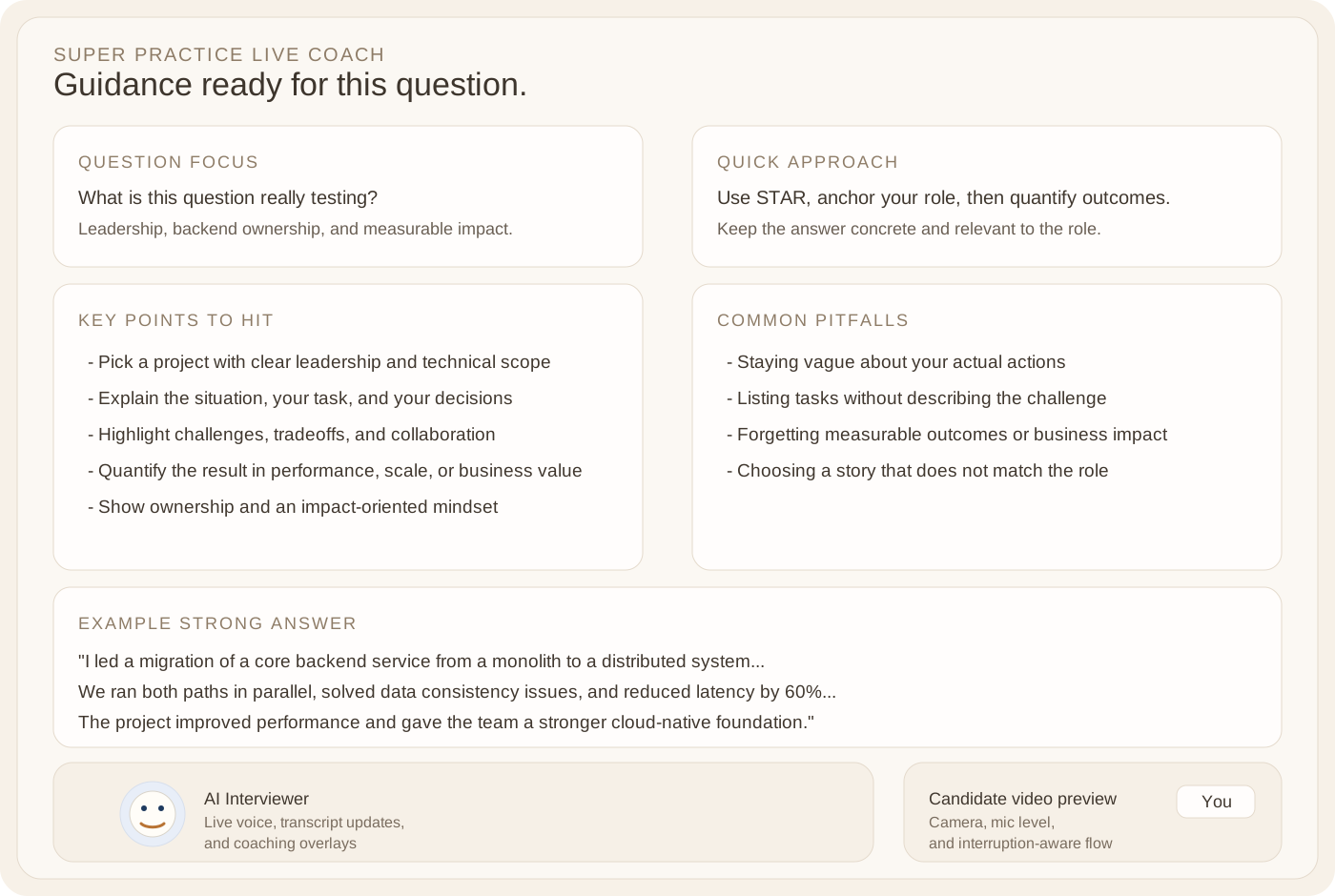
A simplified view of the Super Practice Live Coach layout: each interviewer question fans out into a focused coaching surface instead of a generic wall of feedback.
flowchart TB
    Q[Latest interviewer question] --> F[Question focus]
    Q --> A[Quick approach]
    Q --> K[Key points to hit]
    Q --> P[Common pitfalls]
    Q --> E[Example strong answer]

    F --> C[Candidate answers with better structure]
    A --> C
    K --> C
    P --> C
    E --> C
That feature also changed the product from a passive evaluator into something closer to a real practice environment. You are not only judged after the interview. You are actively coached through it.
Live coaching plus deterministic metrics
I did not want to rely only on model (text only) output for feedback, so I combined the live model with deterministic client-side metrics.
During the interview, the app tracks signals like:
- speaking pace
- response latency after a question
- filler words
- hedging language
- talk ratio between candidate and interviewer
- STAR completeness
- long pauses
- Body language
- topic coverage against the job description
- an audio-confidence score derived from vocal steadiness
That split worked well architecturally too. The model handles interpretation and conversational intelligence. The client handles simpler metrics that are cheap, fast, and predictable.
What was hard
The hard part was not prompting. The hard part was orchestration.
1. Smooth audio is harder than getting audio at all
Streaming audio back from the model is easy in principle. Making it sound smooth is different.
The browser receives AI audio as chunks, but the chunks do not always arrive at perfectly even intervals. I had to add sequencing plus a small client-side jitter buffer so playback would not stutter or underrun every time the network jittered.
That kind of work is invisible when it goes well, which usually means it is the real product work.
2. Interruption handling needs state discipline
For a live interview, you want users to speak naturally, including over the AI when needed. That sounds simple, but it means the client, backend, and model session all need a consistent understanding of who is currently speaking and which turn is active.
I ended up spending a lot more time on turn state, buffering, and transcript synchronization.
3. Reconnect and resume matter more than you think
Live apps break in live ways: laptops sleep, Wi-Fi drops, tabs reload, permissions fail.
So I added server-issued session tickets, reconnect/resume logic, abandoned-session cleanup, and client-side transcript snapshots. Without that, even a short connection hiccup makes the whole experience feel fragile.
4. Safety still matters in a hackathon project
The backend validates payload sizes, rate-limits expensive endpoints, and limits session scope. The report UI renders generated content through safe DOM creation.
I also added report-model fallback behavior so if the preferred report model is unavailable, the app degrades into a transcript-based fallback instead of simply failing at the end of the session.
Deployment choices
I didn’t want to overengineer this, so I kept the frontend intentionally simple: plain HTML, vanilla JavaScript, and a zero-build setup. The backend is Bun + TypeScript and deploys cleanly to Cloud Run with a small Docker image.
That gave me a nice tradeoff:
- fast local iteration
- simple Cloud Run deployment
- automatic scaling from zero when idle
- no unnecessary frontend toolchain complexity for a real-time prototype
flowchart LR
    DEV[Local Bun dev server] --> TEST[Realtime browser testing]
    TEST --> IMAGE[Container build]
    IMAGE --> CR[Cloud Run deployment]
    CR --> LIVEAPP[Public live agent app]
I like this setup for agent prototypes. The infrastructure stays simple, which lets the complexity live where it actually belongs: the interaction loop.
What I learned
The biggest lesson from this build is that multimodal UX quality is mostly a systems problem.
Prompting matters, but once you move into real-time audio and video, the product quality is dominated by:
- latency
- buffering
- session state
- grounding quality
- recovery from dropped connections
- how feedback is surfaced in the UI
I also came away more convinced that the best Live Agent products are not just voice wrappers around a model. They need a clear environment, a specific job to do, and a feedback loop that improves the user while the interaction is happening.
Interview prep happens to be a very good fit for that. But the same pattern would work in other high-stakes coaching workflows too. By doing this challange, many ideas and other usecases for live agents came to me that I would explore further in the near future. For example for language learning, making it a real-time interactive learning experience with real-time feedback.
Closing
Interview Companion Live started as a challenge project for the Gemini Live Agent Challenge, but it turned into a much better exploration of what a practical live agent can look like.
For me, the interesting result is not just that the AI can see, hear, and speak. It is that once the system is grounded, interruption-aware, and paired with useful coaching, it starts to feel like a real product instead of a flashy demo. I would definitely use it for myself for interview prep and I will explore ways for this to reach more people, developing the product further into a coaching / interviewing assistant tool to help people prepare for interviews.
To extend this further, I would probably push in three directions:
- stronger replay and review tools for previous sessions
- deeper coaching around role-specific expectations
- better visual summaries of progress across multiple practice interviews
- Scrape online job postings and interview sites to provide real-world context.
This post was written as part of the Gemini Live Agent Challenge.